
[caption id="attachment_484" align="aligncenter" width="550" caption="A "stick people" family that I made for our car"]
 [/caption]
To begin with, you will need an image. I am making a sign of the Grassland company's logo for a customer, so I will use that as the example for this part. Whether you are using an existing image, or designing your own, you will need to create a new black and white document. You can cut the image out in any color you choose, but the image must be black and white for inkscape to transfer it to a .svg file.

I use photoshop since I am familiar with it - any basic drawing program will work. This particular image was too small (under 1" ) so I created a larger image and cleaned it up. It is very important that your lines are all clean - any imperfections will become very obvious as you blow up the image to cut on a 12"x24" mat. An image that is 6"-8" wide and 72 dpi will cut beautifully. When you have finished designing or cleaning up your image, save a copy as a .bmp file. Go ahead and close your drawing program - you won't be needing it anymore for this file.
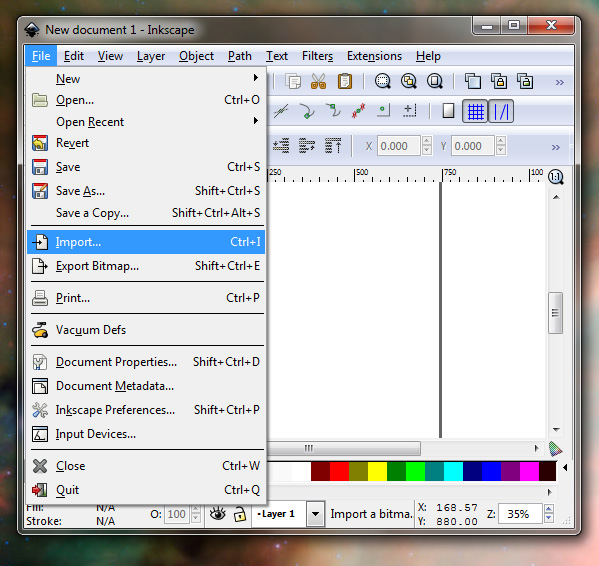
Open up Inkscape, and go to File: Import, or press "Ctrl+I". Select your cleaned up .bmp file to import as a new image in inkscape. The image may not fit on the blank page, and that's ok.

Go to Path: Trace Bitmap, or press "Shift+Alt+B". A pop up box should open with several options.

I leave the settings alone, and haven't had a problem with any of my images. Hit "Update" and make sure that some sort of lines appear in the box - if they don't resemble your image its ok, the preview box is zoomed out and won't show all the details that you are expecting to see. My previewed image appears to have lots of distortions inside of the letters, but the actual path created does not. Hit "OK" to trace the bitmap.

Save the file as an "Inkscape SVG (.svg)" naming it something like "logo.svg". Go ahead and close Inkscape, you won't need it anymore for this file.

Open Sure Cuts A Lot, and import the logo.svg file that you just created. Click on the pretty little picture that says "+SVG" and select your file.

Drag your image to size on the cutting mat. If you hold down the "Shift" key, your image will not distort. As you can see, the text is very crisp and professional looking.
Press the magnifying glass to be sure that none of your image is off of the cutting area. Press the scissors button to cut the image using your cricut machine. Be sure the blade is set to medium speed and medium depth - that way you will only cut through the top layer of vinyl, and the backing paper will remain intact. Part two, how to transfer your vinyl to your surface, is here for small to medium sized images, and here for large images and long text.
A few notes about the stuff I used:
- Paint.net is a free drawing program. Inkscape is a free program as well (I think it is also for drawing, but I have yet to figure out how to use it.) SCAL2 can be purchased for around $70 from Craftedge. Cricut machines are available from amazon, walmart, provocraft, or most craft stores.
- I use 3mil ShineRite commercial vinyl. It can be purchased online, or from a sign supply shop. I live near a Fellers distribution warehouse, so I pick up my vinyl locally. I made a decal for my car out of contact paper, and it held up through a Louisiana summer with no ill effects, so that is also an option depending on what you are making.
- I purchased a 300 foot roll of 6.5" clear transfer tape for $16 from my supplier - I make a lot of stuff that needs transferring, but I doubt that I will finish off the roll of transfer tape. 12 feet of clear contact paper can be purchased for around $4 if you are only making a few signs. The contact paper leaves a slight residue that is easily removed with goo-gone, the transfer tape does not.
- I buy my chloroplast sign blanks from Fellers. I have also seen them at Lowes for around $7 including a yard stake. You can also order them from several different suppliers online.

No comments:
Post a Comment